Description
At almost the exact moment that I decided I could use a little break from all the glazing pictures (and I imagine you guys could use a little variety too), "Sqink":https://www.furaffinity.net/user/sqink/ contacted me about a mini-animation. The timing was perfect, so I figured, why not? And while [i]making[/i] this did end up being a fairly enjoyable endeavour, [i]rendering[/i] this turned into an absolute fucking nightmare.
Every time I tried to render this out, I would get inconsistent lighting results, frame to frame. It resulted in a lot of intense flickering all over the image. Nothing I changed seemed to fix it, and what's worse, renders were inconsistent from batch to batch as well, so I couldn't even hope to brute-force RNG my way through the flickering by re-rendering frames until they didn't flicker, because every frame was randomly different each time.
This took me HOURS to track down. Uuuuughghghgllkdsfsdfoasgpwaer. But I did eventually figure it out- quick story time.
So, my [b]rough[/b] understanding of how shadows work in real-time 3D applications- for each light, under the hood, the renderer essentially places a camera at the light's position and takes a picture of what it can see. Anything in that picture is lit by that light, anything that isn't is in shadow. The more lights you have, the more pictures the renderer has to take, and this eats up memory. You might see where this is going now.
Now I would think that you would just dynamically use ram as needed for this purpose, but I'm not a programmer... for reasons beyond my knowledge, blender has a fixed pre-determined amount of ram set aside for shadow memory. There's a lot of lights in this scene, so I was going over the ram-limit and some shadows would not get rendered, resulting in the weird lighting results.
But it was more insidious than that... If you just blast way past the ram space a warning will pop up in the viewport to tell you you're using too many lights. That's what finally tipped me off.... except I'm fairly certain I was dancing [i]right on the razor's edge[/i] of just barely having enough, so that message wasn't popping up at first, but due to random variance frame to frame I guess I was occasionally tipping over that point and losing some shadows, thus, flickering.
It wasn't until I finally jiggled something in just the right way to trip that error message that I finally got a clue how to fix it... there's a setting in the render settings to just up the amount of shadow memory available. That fixed it, finally.
So uh, long story short, if you use a lot of lights in eevee, be sure to up the shadow ram.
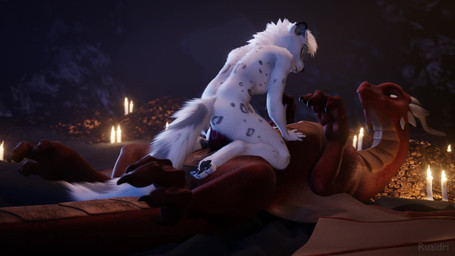
ANYWAY, at least the dragon is having a good time. It's about time someone else had to do the hard work! The dragon decided to add a snep to his collection, and said snep eagerly accepted his new life as a dragon's lap cat.
- Rating
- E
- Score
- 4020
- Favorites
- 6949
- Comments
- 12
- Uploader
- Ruaidri
- File
- jpg 455x256
- Duration
- 4.000s
- Children
- Yes, active